




Superposition#
The superposition principle states that the net response caused by two or more stimuli is the sum of the responses caused by each stimulus individually. This principle holds in magnetostatics when there is no material response, and simply states that the total field created by multiple magnets and currents is the sum of the individual fields.
When two magnets overlap geometrically, the magnetization in the overlap region is given by the vector sum of the two individual magnetizations. This enables two geometric operations,
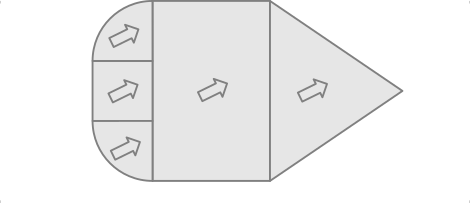
Build complex forms by aligning base shapes (no overlap) with each other with similar magnetization vector.
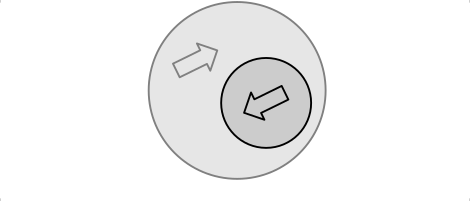
When two objects with opposing magnetization vectors of similar amplitude overlap, they will just cancel in the overlap region. This enables geometric cut-out operations.
Union operation#
Geometric union by superposition is demonstrated in the following example where a wedge-shaped magnet with a round back is constructed from three base-forms: a CylinderSegment, a Cuboid and a TriangularMesh.
import numpy as np
import magpylib as magpy

# Create three magnet parts with similar magnetization
pt1 = magpy.magnet.CylinderSegment(
    magnetization=(500,0,0),
    dimension=(0,4,2,90,270),
)
pt2 = magpy.magnet.Cuboid(
    magnetization=(500,0,0),
    dimension=(2,8,2),
    position=(1,0,0)
)
pt3 = magpy.magnet.TriangularMesh.from_ConvexHull(
    magnetization=(500,0,0),
    points=[(2,4,-1),(2,4,1),(2,-4,-1),(2,-4,1),(6,0,1),(6,0,-1)]
)

# Combine parts in a Collection
magnet = magpy.Collection(pt1, pt2, pt3)

# Add a sensor with path
sensor = magpy.Sensor()
sensor.position = np.linspace((7,-10,0), (7,10,0), 100)

# Plot
with magpy.show_context(magnet, sensor, backend='plotly', style_legend_show=False) as s:
    s.show(col=1)
    s.show(output='B', col=2)
Cut-out operation#
When two objects with opposing magnetization vectors of similar amplitude overlap, they will just cancel in the overlap region. This enables geometric cut-out operations. In the following example we construct an exact hollow cylinder solution from two concentric cylinder shapes with opposite magnetizations, and compare the result to the CylinderSegment class solution.
from magpylib.magnet import Cylinder, CylinderSegment

# Create ring with CylinderSegment
ring0 = CylinderSegment(magnetization=(0,0,100), dimension=(2,3,1,0,360))

# Create ring with cut-out
inner = Cylinder(magnetization=(0,0,-100), dimension=(4,1))
outer = Cylinder(magnetization=(0,0, 100), dimension=(6,1))
ring1 = inner + outer

# Print results
print('CylinderSegment result:', ring0.getB((1,2,3)))
print('Cut-out result:        ', ring1.getB((1,2,3)))
CylinderSegment result: [0.36062145 0.72124291 2.05573729]
Cut-out result:         [0.36062145 0.72124291 2.05573729]
Note that, it is faster to compute the Cylinder field two times than computing the CylinderSegment field one time. This is why Magpylib automatically falls back to the Cylinder solution whenever CylinderSegment is called with 360 deg section angles. Unfortunately, cut-out operations cannot be displayed graphically at the moment, but Custom 3D models offer a solution here.