Magnetic Force and Torque#
The magpylib-force extension provides force and torque computation between Magpylib objects. A detailed description of the API and how the computation is achieved can be found in the user guide.
Warning
Scaling invariance does not hold for force computations! Be careful to provide the inputs in the correct units!
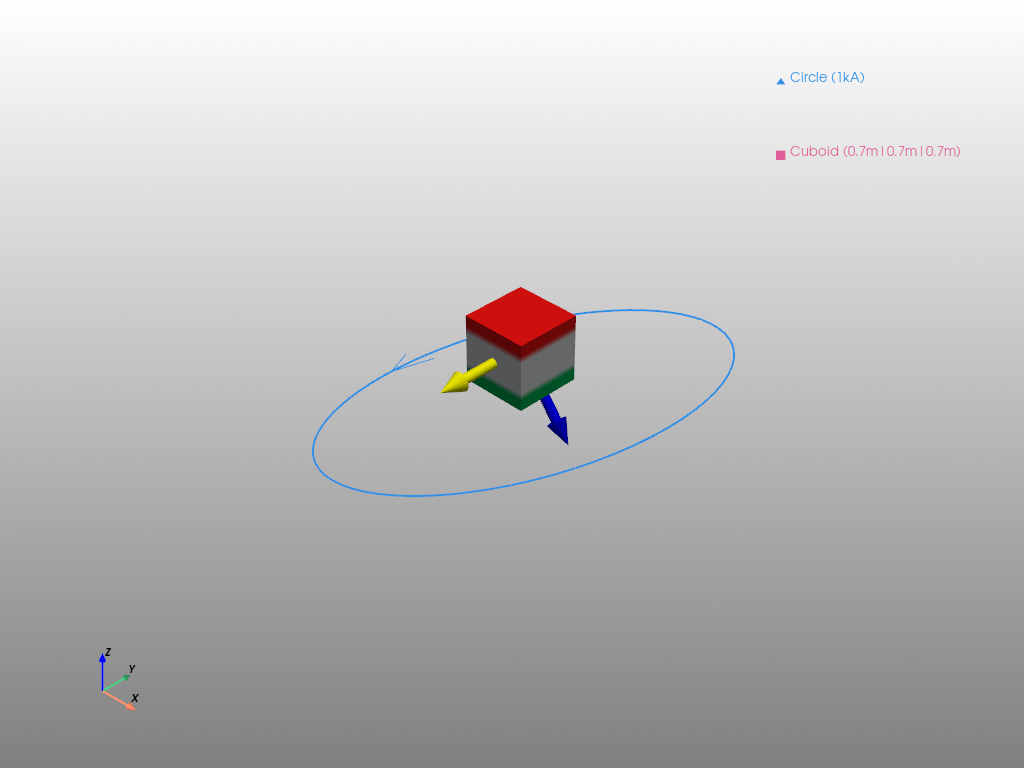
In the following example we show how to compute force and torque between two objects and how to represent it graphically.
import pyvista as pv
import magpylib as magpy
from magpylib_force import getFT

# Source
coil = magpy.current.Circle(position=(0,0,-.5), diameter=4, current=1000)
coil.rotate_from_angax(angle=-20, axis='y')

# Target
cube = magpy.magnet.Cuboid(dimension=(.7,.7,.7), polarization=(0,0,1))
cube.meshing = (10,10,10)

# Compute force and torque
F,T = getFT(coil, cube, anchor=None)

print(f"Force (blue):    {[round(f) for f in F]} N")
print(f"Torque (yellow): {[round(t) for t in T]} Nm")
Force (blue):    [16, 0, -20] N
Torque (yellow): [0, -25, 0] Nm
Force and torque are really strong in this example, because the magnet and the coil are very large objects. With 0.7 m side length, the magnet has a Volume of ~1/3rd cubic meter :).
# Example continued from above

# Plot force and torque in Pyvista with arrows
pl = magpy.show(coil, cube, backend='pyvista', return_fig=True)
arrowF = pv.Arrow(start=(0,0,0), direction=F)
pl.add_mesh(arrowF, color="blue")
arrowT = pv.Arrow(start=(0,0,0), direction=T)
pl.add_mesh(arrowT, color="yellow")

pl.show()
/home/docs/checkouts/readthedocs.org/user_builds/magpylib/envs/5.1.0/lib/python3.10/site-packages/pyvista/jupyter/notebook.py:37: UserWarning: Failed to use notebook backend:

No module named 'trame'

Falling back to a static output.
  warnings.warn(