

Subplots#
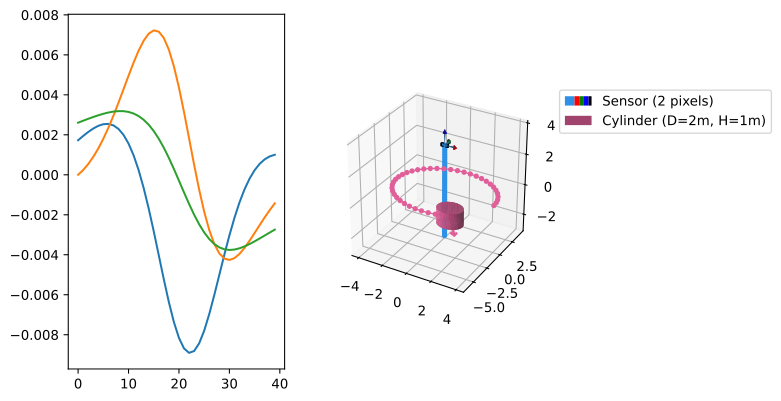
It is very illustrative to combine 2D and 3D subplots when viewing the field along paths. Consider the following system of a sensor and a magnet, both endowed with paths.
import numpy as np
import magpylib as magpy

# Define sensor with path
cyl = magpy.magnet.Cylinder(
    polarization=(1, 0, 0),
    dimension=(2, 1),
    position=(4,0,0),
)
cyl.rotate_from_angax(angle=np.linspace(0, 300, 40), start=0, axis="z", anchor=0)

# Define magnet with path
sens = magpy.Sensor(
    pixel=[(-.2, 0, 0), (.2, 0, 0)],
    position = np.linspace((0, 0, -3), (0, 0, 3), 40)
)
In the following, we demonstrate various ways how to generate 2D/3D subplot combinations for this system.
Plotting canvas with own figure#
Customization is best done by adding the Magpylib 3D-model to your own figure using the canvas kwarg.
# Continuation from above - ensure previous code is executed

import matplotlib.pyplot as plt
fig = plt.figure()
ax1 = fig.add_subplot(121)
ax2 = fig.add_subplot(122, projection='3d')

# Show pixel1 field on ax1
B = sens.getB(cyl)
ax1.plot(B[:,0])

# Place 3D plot on ax2
magpy.show(sens, cyl, canvas=ax2)

plt.show()
How to add and modify subplots in all three supported backends is demonstrated in the canvas documentation. It is also possible to customize the Magpylib 3D output by returning and editing the respective canvas using the return_fig kwarg, see return figures.
Built-in subplots#
For maximal efficiency, Magpylib offers auto-generated subplots of 3D models and the field along paths by providing the show function with proper input dictionaries.
# Continuation from above - ensure previous code is executed

magpy.show(
    {"objects": [cyl, sens], "output": "Bx", "col": 1},
    {"objects": [cyl, sens], "output": "model3d", "col": 2},
    backend='plotly',
)
Detailed information on built-in subplots is provided in the user guide.
show_context#
With a built-in context manager this functionality can be accessed with maximal ease
# Continuation from above - ensure previous code is executed

with magpy.show_context([cyl, sens], backend='plotly') as sc:
    sc.show(output="Bx", col=1, row=1)
    sc.show(output="By", col=1, row=2)
    sc.show(output="Bz", col=2, row=1)
    sc.show(output="model3d", col=2, row=2)
Hint
A very powerful subplot-feature are the built-in animated subplots.