
Position, Orientation, and Paths#
The following sections are detailed technical documentations of the Magpylib position and orientation interface. Practical examples and good practice usage is demonstrated in the tutorial Working with Paths.
The analytical magnetic field expressions found in the literature, implemented in the Magpylib core, are given in native coordinates of the sources which is convenient for the mathematical formulation. It is a common problem to transform the field into an application relevant observer coordinate system. While not technically difficult, such transformations are prone to error.
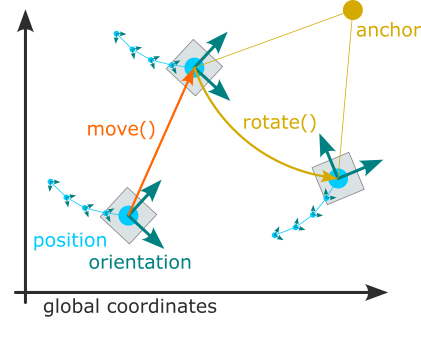
Here Magpylib helps. All Magpylib sources and observers lie in a global Cartesian coordinate system. Object position and orientation are defined by the attributes position and orientation, 😏. Objects can easily be moved around using the move() and rotate() methods. Eventually, the field is computed in the reference frame of the observers (e.g. Sensor objects). Positions are given in units (m), and the default unit for orientation is °.
Position and Orientation#
Position and orientation of all Magpylib objects are defined by the two attributes
position - a point \((x, y, z)\) in the global coordinates, or a set of such points \((\vec{P}_1, \vec{P}_2, ...)\). By default objects are created with position=(0, 0, 0).
orientation - a Scipy Rotation object which describes the object rotation relative to its default orientation (defined in The Magpylib Classes). By default, objects are created with unit rotation orientation=None.
The position and orientation attributes can be either scalar, i.e. a single position or a single rotation, or vector, when they are arrays of such scalars. The two attributes together define the path of an object - Magpylib makes sure that they are always of the same length. When the field is computed, it is automatically computed for the whole path.
Tip
To enable vectorized field computation, paths should always be used when modeling multiple object positions. Avoid using Python loops at all costs for that purpose! If your path is difficult to realize, consider using the functional interface instead.
Move and Rotate#
Magpylib offers two powerful methods for object manipulation:
move(displacement, start="auto") - move object by displacement input. displacement is a position vector (scalar input) or a set of position vectors (vector input).
rotate(rotation, anchor=None, start="auto") - rotates the object by the rotation input about an anchor point defined by the anchor input. rotation is a Scipy Rotation object, and anchor is a position vector. Both can be scalar or vector inputs. With anchor=None the object is rotated about its position.
Scalar input is applied to the whole object path, starting with path index
start. With the defaultstart='auto'the index is set tostart=0and the functionality is moving objects around (incl. their whole paths).Vector input of length \(n\) applies the \(n\) individual operations to \(n\) object path entries, starting with path index
start. Padding applies when the input exceeds the existing path length. With the defaultstart='autothe index is set tostart=len(object path)and the functionality is appending the input.
The practical application of this formalism is best demonstrated by the following program
import magpylib as magpy

# Note that all units are in SI

sensor = magpy.Sensor()
print(sensor.position)  # Default value
#   --> [0. 0. 0.]

sensor.move((1, 1, 1))  # Scalar input is by default applied
print(sensor.position)  # to the whole path
#   --> [1. 1. 1.]

sensor.move([(1, 1, 1), (2, 2, 2)])  # Vector input is by default appended
print(sensor.position)  # to the existing path
#   --> [[1. 1. 1.]  [2. 2. 2.]  [3. 3. 3.]]

sensor.move((1, 1, 1), start=1)  # Scalar input and start=1 is applied
print(sensor.position)  # to whole path starting at index 1
#   --> [[1. 1. 1.]  [3. 3. 3.]  [4. 4. 4.]]

sensor.move([(0, 0, 10), (0, 0, 20)], start=1)  # Vector input and start=1 merges
print(sensor.position)  # the input with the existing path
#   --> [[ 1.  1.  1.]  [ 3.  3. 13.]  [ 4.  4. 24.]]     # starting at index 1.
Several extensions of the rotate() method give a lot of flexibility with object rotation. They all feature the arguments anchor and start which work as described above.
rotate_from_angax(angle, axis, anchor=None, start="auto", degrees=True)
angle: scalar or array with shape (n,). Angle(s) of rotation.axis: array of shape (3,) or string. The direction of the rotation axis. String input can be ‘x’, ‘y’ or ‘z’ to denote respective directions.degrees: bool, defaultTrue. Interpret angle input in units (deg) ifTrueor (rad) ifFalse.
rotate_from_rotvec(rotvec, anchor=None, start="auto", degrees=True)
rotvec: array with shape (n, 3) or (3,). The rotation vector direction is the rotation axis and the vector length is the rotation angle in units (deg).degrees: bool, defaultTrue. Interpret angle input in units (deg) ifTrueor (rad) ifFalse.
rotate_from_euler(angle, seq, anchor=None, start="auto", degrees=True)
angle: scalar or array with shape (n,). Angle(s) of rotation in units (deg) by default.seq: string. Specifies sequence of axes for rotations. Up to 3 characters belonging to the set {‘X’, ‘Y’, ‘Z’} for intrinsic rotations, or {‘x’, ‘y’, ‘z’} for extrinsic rotations. Extrinsic and intrinsic rotations cannot be mixed in one function call.degrees: bool, defaultTrue. Interpret angle input in units (deg) ifTrueor (rad) ifFalse.
rotate_from_quat(quat, anchor=None, start="auto")
quat: array with shape (n, 4) or (4,). Rotation input in quaternion form.
rotate_from_mrp(matrix, anchor=None, start="auto")
matrix: array with shape (n, 3, 3) or (3, 3). Rotation matrix. See scipy.spatial.transform.Rotation for details.
rotate_from_mrp(mrp, anchor=None, start="auto")
mrp: array with shape (n, 3) or (3,). Modified Rodrigues parameter input. See scipy Rotation package for details.
When objects with different path lengths are combined, e.g. when computing the field, the shorter paths are treated as static beyond their end to make the computation sensible. Internally, Magpylib follows a philosophy of edge-padding and end-slicing when adjusting paths.
Edge-padding: whenever path entries beyond the existing path length are needed the edge-entries of the existing path are returned. This means that the object is “static” beyond its existing path.
End-slicing: whenever a path is automatically reduced in length, Magpylib will slice such that the ending of the path is kept.
The tutorial Working with Paths shows intuitive good practice examples of the important functionality described in this section.