
The Magpylib Classes#
In Magpylib’s object oriented interface magnetic field sources (generate the field) and observers (read the field) are created as Python objects with various defining attributes and methods.
Base properties#
The following basic properties are shared by all Magpylib classes:
The position and orientation attributes describe the object placement in the global coordinate system.
The move() and rotate() methods enable relative object positioning.
The reset_path() method sets position and orientation to default values.
The barycenter property returns the object barycenter (often the same as position).
See Position, Orientation, and Paths for more information on these features.
The style attribute includes all settings for graphical object representation.
The show() method gives quick access to the graphical representation.
See Graphic output for more information on graphic output, default styles and customization possibilities.
The getB(), getH(), getJ() and getM() methods give quick access to field computation.
See Field Computation for more information.
The parent attribute references a Collection that the object is part of.
The copy() method creates a clone of any object where selected properties, given by kwargs, are modified.
The describe() method provides a brief description of the object and returns the unique object id.
Local and global coordinates#
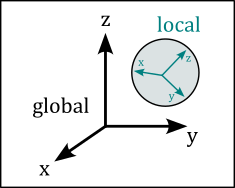
Magpylib objects span a local reference frame, and all object properties are defined within this frame, for example the vertices of a Tetrahedron magnet. The position and orientation attributes describe how the local frame lies within the global coordinates. The two frames coincide by default, when position=(0,0,0) and orientation=None (=unit rotation). The position and orientation attributes are described in detail in Position, Orientation, and Paths.
Magnet classes#
All magnets are sources. They have the polarization attribute which is of the format \(\vec{J}=(J_x, J_y, J_z)\) and denotes a homogeneous magnetic polarization vector in the local object coordinates in units of T. Alternatively, the magnetization vector can be set via the magnetization attribute of the format \(\vec{M}=(M_x, M_y, M_z)\). These two parameters are codependent and Magpylib ensures that they stay in sync via the relation \(\vec{J}=\mu_0\cdot\vec{M}\). Information on how this is related to material properties from data sheets is found in Modelling a real magnet.
Cuboid#
magpylib.magnet.Cuboid(position, orientation, dimension, polarization, magnetization, style)
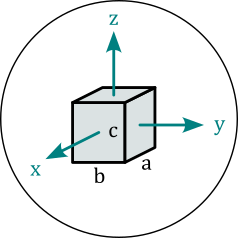
Cuboid objects represent magnets with cuboid shape. The dimension attribute has the format \((a,b,c)\) and denotes the sides of the cuboid units of meter. The center of the cuboid lies in the origin of the local coordinates, and the sides are parallel to the coordinate axes.
Cylinder#
magpylib.magnet.Cylinder(position, orientation, dimension, polarization, magnetization, style)
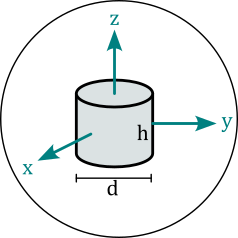
Cylinder objects represent magnets with cylindrical shape. The dimension attribute has the format \((d,h)\) and denotes diameter and height of the cylinder in units of meter. The center of the cylinder lies in the origin of the local coordinates, and the cylinder axis coincides with the z-axis.
CylinderSegment#
magpylib.magnet.CylinderSegment(position, orientation, dimension, polarization, magnetization, style)
CylinderSegment objects represent magnets with the shape of a cylindrical ring section. The dimension attribute has the format \((r_1,r_2,h,\varphi_1,\varphi_2)\) and denotes inner radius, outer radius and height in units of meter, and the two section angles \(\varphi_1<\varphi_2\) in °. The center of the full cylinder lies in the origin of the local coordinates, and the cylinder axis coincides with the z-axis.
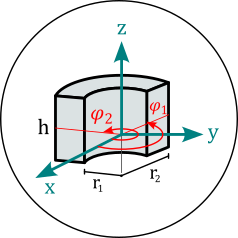
Info: When the cylinder section angles span 360°, then the much faster Cylinder methods are used for the field computation.
Sphere#
magpylib.magnet.Sphere(position, orientation, diameter, polarization, magnetization, style)
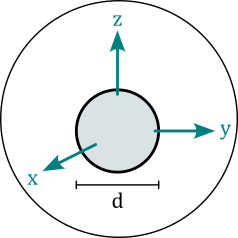
Sphere objects represent magnets of spherical shape. The diameter attribute is the sphere diameter \(d\) in units of meter. The center of the sphere lies in the origin of the local coordinates.
Tetrahedron#
magpylib.magnet.Tetrahedron(position, orientation, vertices, polarization, magnetization, style)
Tetrahedron objects represent magnets of tetrahedral shape. The vertices attribute stores the four corner points \((\vec{P}_1, \vec{P}_2, \vec{P}_3, \vec{P}_4)\) in the local object coordinates in units of m.
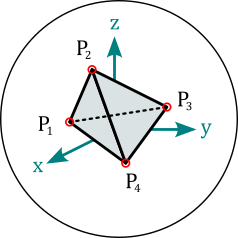
Info: The Tetrahedron field is computed from four Triangle fields.
TriangularMesh#
magpylib.magnet.TriangularMesh(position, orientation, vertices, faces, polarization, magnetization, check_open, check_disconnected, check_selfintersecting, reorient_faces, style)
TriangularMesh objects represent magnets with surface given by a triangular mesh. The mesh is defined by the vertices attribute, an array of all unique corner points \((\vec{P}_1, \vec{P}_2, ...)\) in units of meter, and the faces attribute, which is an array of index-triplets that define individual faces \((\vec{F}_1, \vec{F}_2, ...)\). The property mesh returns an array of all faces as point-triples \([(\vec{P}_1^1, \vec{P}_2^1, \vec{P}_3^1), (\vec{P}_1^2, \vec{P}_2^2, \vec{P}_3^2), ...]\).
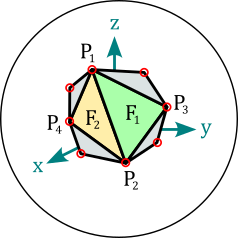
At initialization the mesh integrity is automatically checked, and all faces are reoriented to point outwards. These actions are controlled via the kwargs
check_open
check_disconnected
check_selfintersecting
reorient_faces
which are all by default set to "warn". Options are "skip" (don’t perform check), "ignore" (ignore if check fails), "warn" (warn if check fails), "raise" (raise error if check fails).
Results of the checks are stored in the following object attributes
status_open can be
True,FalseorNone(unchecked)status_open_data contains an array of open edges
status_disconnected can be
True,FalseorNone(unchecked)status_disconnected_data contains an array of mesh parts
status_selfintersecting can be
True,NoneorNone(unchecked)status_selfintersecting_data contains an array of self-intersecting faces
status_reoriented can be
TrueorFalse
The checks can also be performed after initialization using the methods
check_open()
check_disconnected()
check_selfintersecting()
reorient_faces()
The following class methods enable easy mesh creating and mesh loading.
TriangularMesh.from_mesh() generates a
TriangularMeshobjects from the input mesh, which is an array in the mesh format \([(\vec{P}_1^1, \vec{P}_2^1, \vec{P}_3^1), (\vec{P}_1^2, \vec{P}_2^2, \vec{P}_3^2), ...]\).TriangularMesh.from_ConvexHull() generates a
TriangularMeshobject from the input points, which is an array of positions \((\vec{P}_1, \vec{P}_2, \vec{P}_3, ...)\) from which the convex Hull is computed via the Scipy ConvexHull implementation.TriangularMesh.from_triangles() generates a
TriangularMeshobject from the input triangles, which is a list or aCollectionofTriangleobjects.TriangularMesh.from_pyvista() generates a
TriangularMeshobject from the input polydata, which is a Pyvista PolyData object.
The method to_TriangleCollection() transforms a TriangularMesh object into a Collection of Triangle objects.
Info: While the checks may be disabled, the field computation guarantees correct results only if the mesh is closed, connected, not self-intersecting and all faces are oriented outwards. Examples of working with the TriangularMesh class are found in Triangular Meshes and in Pyvista Bodies.
Current classes#
All currents are sources. Current objects have the current attribute which is a scalar that denotes the electrical current in units of ampere.
Circle#
magpylib.current.Circle(position, orientation, diameter, current, style)
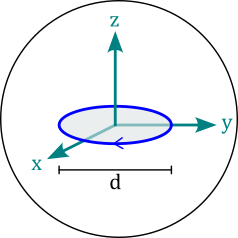
Circle objects represent circular line current loops. The diameter attribute is the loop diameter \(d\) in units of meter. The loop lies in the xy-plane with it’s center in the origin of the local coordinates.
Polyline#
magpylib.current.Polyline(position, orientation, vertices, current, style)
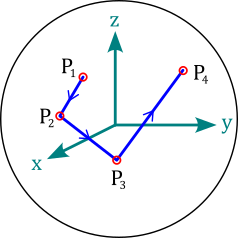
Polyline objects represent line current segments where the electric current flows in straight lines from vertex to vertex. The vertices attribute is a vector of all vertices \((\vec{P}_1, \vec{P}_2, ...)\) given in the local coordinates in units of meter.
Miscellaneous classes#
There are classes listed hereon that function as sources, but they do not represent physical magnets or current distributions.
Dipole#
magpylib.misc.Dipole(position, orientation, moment, style)
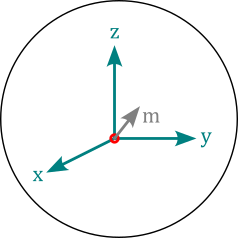
Dipole objects represent magnetic dipole moments with the moment attribute that describes the magnetic dipole moment \(\vec{m}=(m_x,m_y,m_z)\) in SI-units of Am², which lies in the origin of the local coordinates.
Info: The total dipole moment of a homogeneous magnet with body volume \(V\) is given by \(\vec{m}=\vec{M}\cdot V\).
Triangle#
magpylib.misc.Triangle(position, orientation, vertices, polarization, magnetization, style)
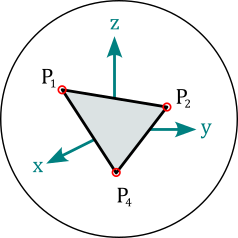
Triangle objects represent triangular surfaces with homogeneous charge density given by the projection of the polarization or magnetization vector onto the surface normal. The attributes polarization and magnetization are treated similar as by the Magnet classes. The vertices attribute is a set of the three triangle corners \((\vec{P}_1, \vec{P}_2, \vec{P}_3)\) in units of meter in the local coordinates.
Info: When multiple Triangles with similar magnetization/polarization vectors form a closed surface, and all their orientations (right-hand-rule) point outwards, their total H-field is equivalent to the field of a homogeneous magnet of the same shape. In this case, the B-field is only correct on the outside of the body. On the inside the polarization must be added to the field. This is demonstrated in the tutorial Triangular Meshes.
CustomSource#
magpylib.misc.CustomSource(field_func, position, orientation, style)
The CustomSource class is used to create user defined sources provided with with custom field computation functions. The argument field_func takes a function that is then automatically called for the field computation. This custom field function is treated like a core function. It must have the positional arguments field with values "B" or "H", and observers (must accept array with shape (n,3)) and return the B-field and the H-field with a similar shape.
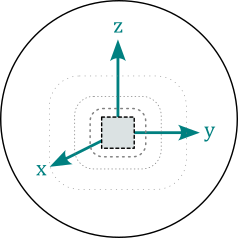
Info: A tutorial CustomSource is found in the examples.
Sensor#
magpylib.Sensor(position, orientation, pixel, handedness, style)
Sensor objects represent observers of the magnetic field and can be used as Magpylib observers input for magnetic field computation. The pixel attribute is an array of positions \((\vec{P}_1, \vec{P}_2, ...)\) provided in units of meter in the local sensor coordinates. A sensor returns the magnetic field at these pixel positions. By default pixel=(0,0,0) and the sensor simply returns the field at it’s position. The handedness attribute can be "left" or "right" (default) to set a left- or right-handed sensor coordinate system for the field computation.
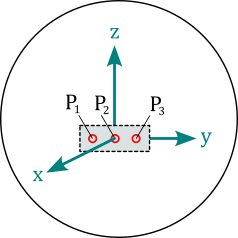
Info: Sensors can have their own position and orientation and enable easy relative positioning between sources and observers. The field is always computed in the reference frame of the sensor, which might itself be moving in the global coordinate system. Magpylib sensors can be understood as perfect magnetic field sensors with infinitesimally sensitive elements. An example how to use sensors is given in Using Sensors.
Collection#
magpylib.Collection(*children, position, orientation, override_parent, style)
A Collection is a group of Magpylib objects that is used for common manipulation. All these objects are stored by reference in the children attribute. The collection becomes the parent of the object. An object can only have one parent. There are several options for accessing only specific children via the following properties
sources: return only sources
observers: return only observers
collections: return only collections
sources_all: return all sources, including the ones from sub-collections
observers_all: return all observers, including the ones from sub-collections
collections_all: return all collections, including the ones from sub-collections
Additional methods for adding and removing children:
add(): Add an object to the collection
remove(): Remove an object from the collection
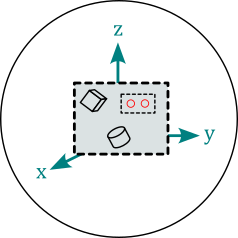
Info: A collection object has its own position and orientation attributes and spans a local reference frame for all its children. An operation applied to a collection moves the frame and is individually applied to all children such that their relative position in the local reference frame is maintained. This means that the collection functions as a container for manipulation, but child position and orientation are always updated in the global coordinate system. After being added to a collection, it is still possible to manipulate the individual children, which will also move them to a new relative position in the collection frame.
Collections have format as an additional argument for describe() method. Default value is format="type+id+label". Any combination of "type", "id", and "label" is allowed.
A tutorial Working with Collections is provided in the example examples.