

Inhomogeneous Magnetization#
The explicit expressions implemented in Magpylib treat only simple homogeneous polarizations. When dealing with high-grade materials that are magnetized in homogeneous fields this is a good approximation. However, there are many cases where such a homogeneous model is not justified. The tutorial Modelling a real magnet and the user-guide Magnets and Demagnetization provide some insights on this topic.
Here we show how to deal with inhomogeneous polarization based on a commonly misunderstood example of a cylindrical quadrupol magnet. While graphical representations of such magnets usually depict only four poles, see Magnet colors, such magnets exhibit complex polarization given by the magnetization device that is used to magnetize them.
The following code shows how the field of such a magnetization device would look like and what magnetization field it produces. To relize a Cylindrical Quadrupole magnert there are four coils with ferromagnetic cores involved, arranged in circle around the magnet. In the example, coils and cores are modeled by Cuboid magnets.
Note
While Magpylib uses SI units by default, in this example we make use of scaling invariance and consider arbitrary input length units. For this example millimeters are sensible.
import numpy as np
import matplotlib.pyplot as plt
import magpylib as magpy

# Create figure with 2D and 3D canvas
fig = plt.figure(figsize=(8, 4))
ax1 = fig.add_subplot(121, projection='3d')
ax2 = fig.add_subplot(122)

# Model of magnetization tool
tool1 = magpy.magnet.Cuboid(
    dimension=(5, 3, 3),
    polarization=(1, 0, 0),
    position=(9, 0, 0)
).rotate_from_angax(50, 'z', anchor=0)
tool2 = tool1.copy(polarization=(-1,0,0)).rotate_from_angax(-100, 'z', 0)
tool3 = tool1.copy().rotate_from_angax(180, 'z', 0)
tool4 = tool2.copy().rotate_from_angax(180, 'z', 0)
tool = magpy.Collection(tool1, tool2, tool3, tool4)

# Model of Quadrupole Cylinder
cyl = magpy.magnet.CylinderSegment(
    dimension=(2, 5, 1, 0, 360),
    polarization=(0, 0, 0),
    style_magnetization_show=False,
)

# Plot 3D model on ax1
magpy.show(cyl, tool, canvas=ax1, style_legend_show=False, style_magnetization_mode="color")
ax1.view_init(90, -90)

# Compute and plot tool-field on grid
grid = np.mgrid[-6:6:50j, -6:6:50j, 0:0:1j].T[0]
X, Y, _ = np.moveaxis(grid, 2, 0)

B = tool.getB(grid)
Bx, By, Bz = np.moveaxis(B, 2, 0)

ax2.streamplot(X, Y, Bx, By,
    color=np.linalg.norm(B, axis=2),
    cmap='autumn',
    density=1.5,
    linewidth=1,
)

# Outline magnet boundary
ts = np.linspace(0,2*np.pi,200)
ax2.plot(2*np.sin(ts), 2*np.cos(ts), color='k', lw=2)
ax2.plot(5*np.sin(ts), 5*np.cos(ts), color='k', lw=2)

# Plot styling
ax2.set(
    title="B-field in xy-plane",
    xlabel="x-position",
    ylabel="y-position",
    aspect=1,
)

plt.tight_layout()
plt.show()
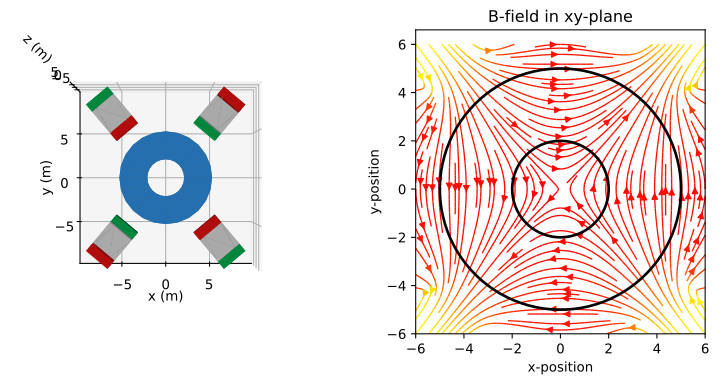
It can be assumed that the polarization that is written into the unmagnetized Cylinder will, in a lowest order approximation, follow the magnetic field generated by the magnetization tool. To create a Cylinder magnet with such a polarization pattern we apply the superposition principle and approximate the inhomogneous polarization as the sum of multiple small homogeneous cells using the CylinderSegment class. Splitting up the Cylinder into many cells is easily done by hand, but for practicality we make use of the magpylib-material-response package which provides an excellent function for this purpose.
# Continuation from above - ensure previous code is executed

from magpylib_material_response.meshing import mesh_Cylinder

# Create figure with 2D and 3D canvas
fig = plt.figure(figsize=(8, 4))
ax1 = fig.add_subplot(121, projection='3d')
ax2 = fig.add_subplot(122)

# Show Cylinder cells
mesh = mesh_Cylinder(cyl,30)
magpy.show(*mesh, canvas=ax1, style_magnetization_show=False)

# Apply polarization
for m in mesh:
    Btool = tool.getB(m.barycenter)
    m.polarization = Btool/np.linalg.norm(Btool)

# Compute and plot polarization
J = mesh.getJ(grid)
J[np.linalg.norm(J, axis=2) == 0] = np.nan # remove J=0 from plot
Jx, Jy, _ = np.moveaxis(J, 2, 0)

Jangle = np.arctan2(Jx, Jy)

ax2.contourf(X, Y, Jangle, cmap="rainbow", levels=30)
ax2.streamplot(X, Y, Jx, Jy, color='k')

# Outline magnet boundary
ts = np.linspace(0,2*np.pi,200)
ax2.plot(2*np.sin(ts), 2*np.cos(ts), color='k', lw=2)
ax2.plot(5*np.sin(ts), 5*np.cos(ts), color='k', lw=2)

# Plot styling
ax2.set(
    title="Polarization J in xy-plane",
    xlabel="x-position",
    ylabel="y-position",
    aspect=1,
)
plt.tight_layout()
plt.show()
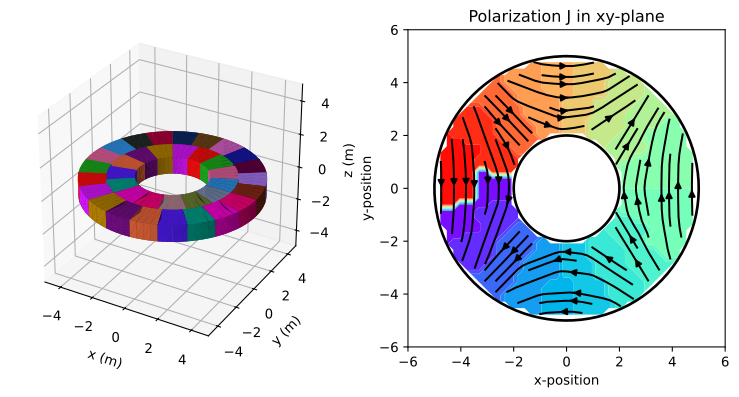
The color on the right-hand-side corresponds to the angle of orientation of the material polarization. Increasing the mesh finesse will improve the approximation but slow down any field computation at the same time.
What is the purpose of this example ? In addition to demonstrating how inhomogeneous polarizations can be modeled, this example should raise awareness that many magnets can look simple on a data sheet (color pattern) but may have an inhomogeneous, complex, unknown polarization distribution. It goes without saying that the magnetic field generated by such a magnet, for example in an angle sensing application, will depend strongly on the polarization.